In my earlier article, Learning through Challenges: The Effective Science Behind AwesomeGCP.com, I detailed how cognitive science, active recall, worked examples, and fading scaffolding form the foundation of question construction at AwesomeGCP. We learn best when we are challenged to retrieve and apply knowledge rather than passively watching a video or skimming notes.
Yet, building a platform rooted in learning science presents a profound design puzzle: how do you effectively teach beginners, intermediate learners, and seasoned experts all at once?
The Learning Dilemma: Content for One Fails the Other
One of the hardest aspects of technical education is that instructional material crafted for one audience level frequently alienates another:
The Beginner's Dilemma
A beginner is easily overwhelmed by dense text littered with specialized jargon, API flags, and acronyms. Flooding their limited working memory triggers cognitive overload, making them feel inadequate to the task and ultimately shutting down learning before it starts.
The Expert's Dilemma
An experienced architect or engineer forced to wade through lengthy ELI5 or ELI20 ("explain like I am 20") explanations gets frustrated. The redundant repeated repetition feels slow and laborious, slowing down their momentum and causing them to disengage.
In cognitive psychology, this shift is known as the Expertise Reversal Effect. As learners build mental schemas and progress from beginner to intermediate to expert, their instructional needs invert. Heavy guidance, worked examples, and glossary definitions that are essential lifelines for a novice turn into counterproductive cognitive clutter for an expert.
How AwesomeGCP Balances Depth Across Levels
To respect everyone's time and cognitive bandwidth, we use clear differentiation:
- Simple Warmup Questions: Primarily designed for beginners and early intermediates to establish baseline schemas and confidence. If you are already an expert, you should skip right past these!
- Regular Questions: Crafted to be tougher, reflecting authentic real-world architectures, edge cases, and difficult trade-offs typical of the type of questions you will find in the Professional certifications.
- Dense, Realistic Explanations: Cloud engineering is notoriously full of specialized terminology, a very wide list of products and services, concepts, and supporting systems. Even for seasoned experts, it is virtually impossible to keep every nuance in instant recall.
I needed a way to give anyone a fast, on-demand refresher without cluttering the page or forcing them to switch tabs to read through Google Cloud documentation.
That is why I am adding a new feature called Doclet which will apply across all questions.
The Doclet Feature
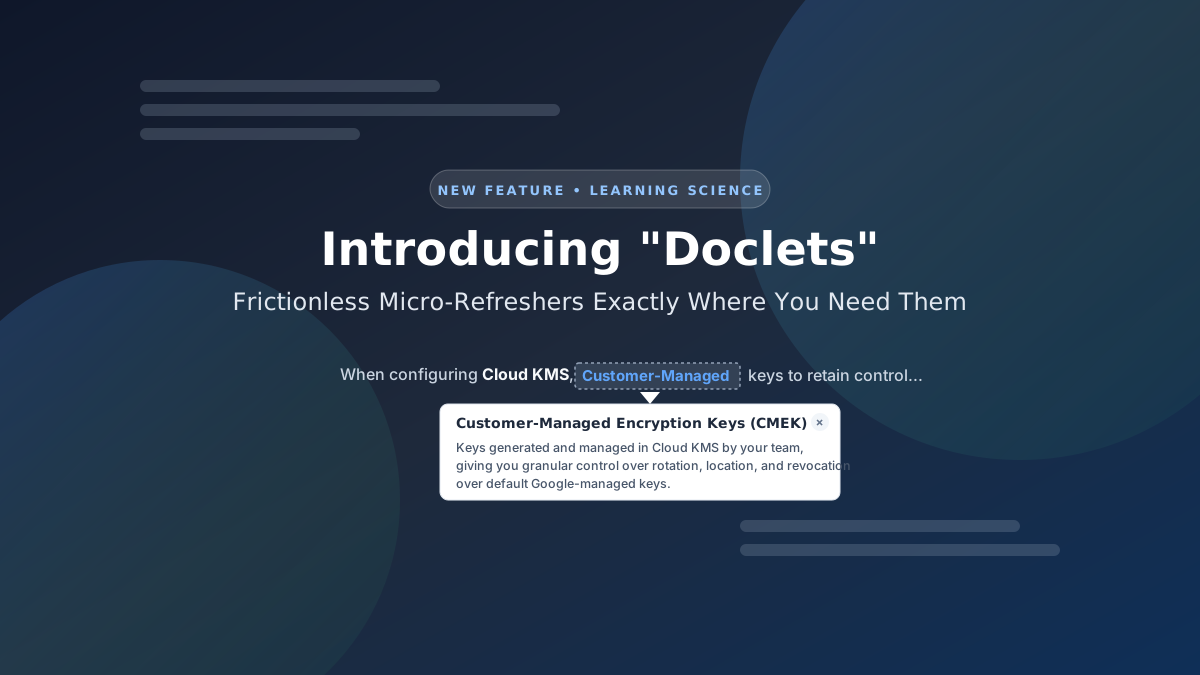
Visually, a doclet appears with a grey dotted underline and a light grey background. It sits subtly within the sentence: it is discernible enough if you need it, but completely unobtrusive if you already know the term and are skimming through.
Clicking a doclet brings up a short in-place popover, usually around 100 words, that provides a crisp, focused refresher.
- Zero distraction: You stay in your flow state without opening external documentation tabs.
- Instant dismissal: Pressing Esc, clicking anywhere outside the popover, or clicking the × button on the top-right instantly hides it.
When designing a multi-region disaster recovery architecture, your database must use witness replicas to maintain quorum without paying full storage costs. Ensure encryption uses CMEK and audit every administrative action using Data Access logs.
Title
Description
Whether you are a beginner checking unfamiliar jargon for the first time, an intermediate learner confirming how two services interact, or an expert looking for a 5-second refresher on an obscure parameter, doclets put exactly the right amount of scaffolding at your fingertips.
How it works
... and current behaviour and limitations.
In the current implementation, a doclet is defined centrally. Every page that has a matching string in the Question Analysis, Knowledge Up, and Explanation sections, will automatically apply the doclet. (p.s. I also have a feature flag that toggles the feature across the site). That's the only scalable way currently to scale out the doclets across thousands of questions.
But, when done like that, it might also result in redundant doclets. I know that. But I'll starts with that and apply doclets more granularly with greater focus over time.
For now, expect to see little doclets scattered across the site as we add more.
The Name: Why "Doclet"?
Where did the name come from?
A doclet is literally a little bit of the docs.
Official cloud documentation is thorough, but often spanning tens of thousands of words across multiple reference manuals. When you are wrestling with an active question scenario, you don't want a 20-page guide. You just want a little bit of the docs right where your eyes already are.
Enjoy the smoother reading experience as you work through questions on AwesomeGCP, and let me know via my LinkedIn or through the feedback on each question page about doclets that I should add.
AwesomeGCP.com Learning
The approach taken is a question-led learning approach: you explore realistic project scenarios where you need to make decisions or take actions to achieve business goals within specific constraints. Instead of passive learning, you are challenged to think and work through the options. This impresses concepts and knowledge more deeply, and equips you with the ability to do well at your work or ace the exam!